Signals
Signals are the core of any strategy. They return a True when all of the conditions described inside the signal are met. You can also configure a signal to return True if only some conditions are met, or specifically 3 out of any 5 conditions, etc. Anything is possible within a signal with built-in no-code builder and a freestyle code window.
There are four main sections to the Signal builder to be familiar with:

- Menu of items that can be included into signal logic
- Applies Studies includes all of SC studies applied to the chartbook OP study is attached to.
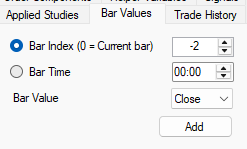
- Bar Values allows to reference OHLC of any chart bar. 0 = current, -1 = prior, -2 = one before prior, etc. Example: Value of two bars ago Close:
- Trade History allows to reference current trade items placed by the strategy using this signal (fill bar index, entry price, target/stop information. This is useful to create order exit or modification signals.
- Helper Variables more on this in it’s own section, but allows to use SC Aliases and Persistent Variables inside trade signals
- Signals allows to reference other signals. Useful to create multiple simpler signals and then combine them into one instead of creating a very complex single signal that is difficult to track
- Order Components allows sampling current order components for trade modification signal creation and other needs.
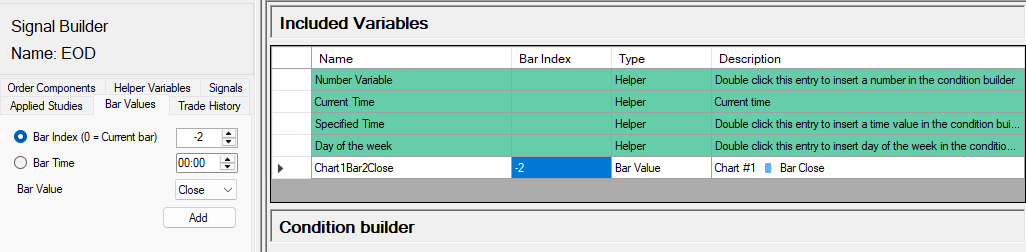
- Included Variables that have been selected to take part in the current signal.
- Green rows are static and can be used for their designated task in Condition Builder (below).
- White rows are studies and components the user selected to be part of the signal from menu 1). Example: Two bars ago close value added to Included Variables
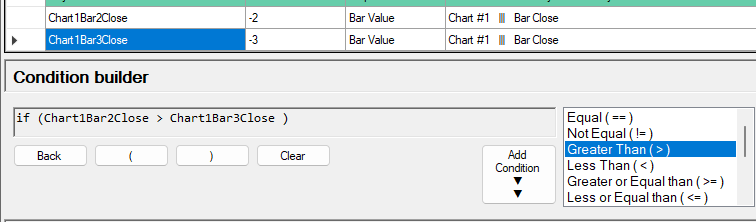
- No-code Condition Builder allows users to double-click through variables, brackets, and comparative operators on the right to create entry signals. Example: 2 bars ago close is greater than 3 bars ago close:
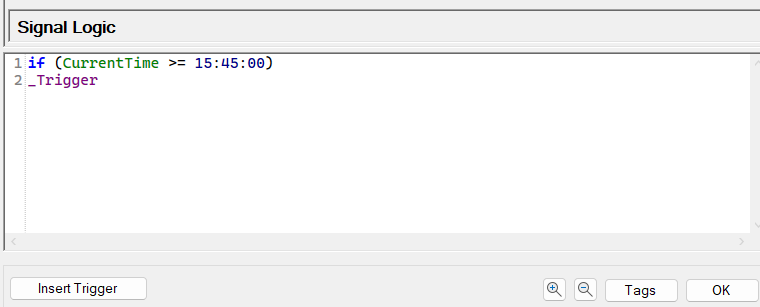
- Resulting Signal Logic code. This is a freestyle C++ window that can (and should) be populated by condition builder above to avoid mistakes, but allows user to create any signal code they want, provided it follows C++ language rules.Example: If current time is greater or equal to 3:45PM, trigger the signal: